


Micromanagement is one of the worst types of management because it takes away employee autonomy. People hate micromanagement because they don’t like to have everything about them judged and scrutinized.
This kind of management leads to low productivity and employee dissatisfaction, eventually leading to high employee turnover.
To avoid this with your employees, invest in tools that monitor employee activity without micromanaging their work.
The number of employee monitoring software tools that exist today is staggering. Finding what you need for employee monitoring is difficult.
This article will provide an overview of the best eight tools available on the market today, which are meant for small-to-medium-sized companies.
Top 5 Ways To Avoid Micromanagement With Employee Monitoring Tools
Here are five ways to avoid micromanagement at your workplace with the help of employee monitoring tools while keeping tabs on their performance.
1. Only Focus on Key Metrics
If you have too many metrics to measure, you quickly become overwhelmed and lose focus. It’s also easier for employees to focus on just a few key metrics that give them valuable information about how they’re doing and whether they should keep going in their current direction.
The benefit of having fewer metrics is that they’re easier to understand and require less explanation. When you have fewer metrics, it becomes easier for managers to learn how each employee can use them as personal goals instead of dictating how each individual should operate daily.
In turn, that gives managers more time to observe each team member’s unique strengths and weaknesses. They can set realistic goals that help each person improve in areas where they need work.
2. Don’t Check In Constantly
If you keep a check on your employees, they feel you don’t trust them to do their job. They feel you don’t trust them to do their job. You can also use employee monitoring tools to track progress.
3. Allow Some Flexibility in Daily Schedules
Letting employees have some control over their daily schedules can help to avoid micromanagement. It could mean allowing them to choose their start and end times or letting them take a longer lunch break one day a week. Whatever the case, giving employees some flexibility can help avoid micromanagement.
4. Empower Team Members with Freedom
One way to avoid micromanagement is to empower team members with the freedom to work how they want. Use employee monitoring tools to allow them to work from home, set their hours, and take breaks when needed. It also means trusting them to finish their work without constantly checking in on them.
5. Set Up an Internal Communication Platform
One way to avoid micromanagement is to set up an internal communication platform where employees can voice their concerns, give feedback, and ask questions. This way, managers can stay in the loop without constantly checking in on their team. Plus, it provides a space for open dialogue, which can help build trust and respect.
Top 8 Employee Monitoring Tools To Avoid Micromanagement
1. Workstatus
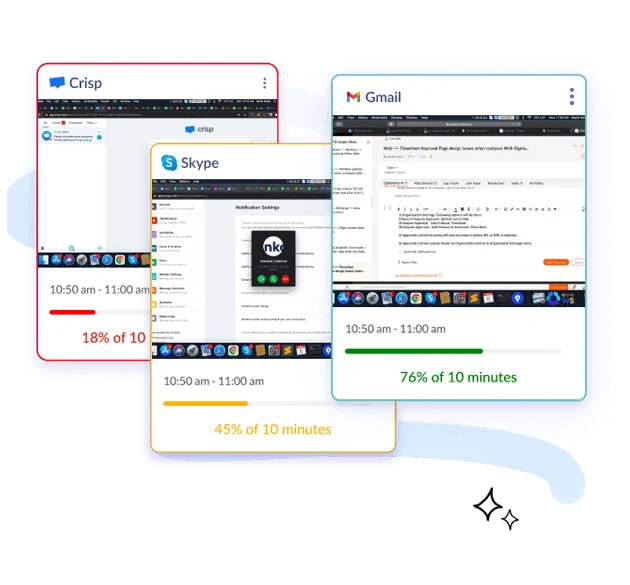
Workstatus has been designed to provide companies with easy access to knowing where their employees are and whether they’re on their phones.
It can monitor what apps they’ve used during work hours and how long they’ve been working on them while storing these statistics neatly in databases so that you can check up on them as necessary.
With all these features, it’ll be easier for employers to know exactly what their employees have been doing.
Key Features:
- Idle Time Monitoring
- Active Screenshots
- Built-in Productivity Meter
- GPS Time Tracker
- Reports with Graphs and Charts
- App and Website Monitoring
Pricing:
- Free Forever Package: $0 forever
- Starter Package: $4.99 /user/month
- Scale Package: $9.99 /user/month
- Enterprise Package: $18 /user/month
Sign up to try the best productivity tracking software to boost your employees’ productivity without micromanagement.
2. Time Doctor
Time Doctor is a detailed time tracking software that allows managers to see how long their staff members spend on various tasks. This transparency builds trust between managers and the company’s clients.
You can also get a comprehensive idea of your employees’ effectiveness throughout the day. It includes what websites or apps they use and who they talk to over chat programs.
Key Features:
- Productivity Analysis
- Notifications
- Remote Control
Pricing:
- Basic: $7/month, 1 user
- Standard: $10/month, 1 user
- Premium: $20/month, 1 user
3. Monitask
Monitask is a screen monitoring software that helps businesses manage, monitor, and provide insight into the work done by remote employees. It enables them to track online employee activity, log hours spent working and taking breaks, take screenshots of what they are doing now and then, and keep tabs on usage stats.
All this information creates an easy-to-use platform that allows companies to see exactly how much time their employees spend working at the office and empowers them to take back control over their productivity levels.
Key Features:
- Browsing History
- Employee Activity Monitoring
- Time Tracking
Pricing:
- Pro: $5.99/mo/per user
- Business:$8.99/mo/per user
- Enterprise:$19.99/mo/per user
4. Interguard
Interguard allows you to control your employees’ desktops without moving from your office chair. This software keeps track of everything they do and compiles detailed reports and logs, which will help you monitor activity while ensuring that sensitive files remain secure. With Interguard, there’s never a reason for late nights pouring over paperwork again!
Key Features:
- Productivity Analysis
- Keystroke Recording
- Alerts/Notifications
Pricing:
- Free Cloud Trial
- Cloud Hosted- $9/user/month
- Enterprise On-Premise: Custom pricing
5. ActivTrak
ActivTrak is one of the employee monitoring software tools that also provides insightful data about work habits. It does this invisibly and at your discretion, depending on the options you select before installing it onto employees’ computers. This way, you can see a much more accurate depiction of how people spend their time when they don’t know they’re being watched.
Key Features:
- Time Tracking
- Browsing History
- Email Monitoring
Pricing:
- Free: $0/user/month
- Advanced:$9/user/month
- Premium:$15/user/month
- Enterprise: Contact for pricing
6. Deputy
Deputy is one of the best employee monitoring software tools that helps teams stay on schedule. It does so by ensuring that tasks are executed during the assigned time, which could otherwise be missed due to forgetting or other reasons. Deputy assists with managing tasks and administrative duties, so it’s no surprise that various organizations use it, from non-profits to government agencies.
Key Features:
- Work monitoring
- Automatic scheduling
- Task creation and assignment
Pricing:
- Scheduling: $3.50/month
- Time & Attendance: $3.50/month
- Premium: $4.90/month
- Enterprise: Contact for pricing
7. DeskTime
Desktime makes it easy for employees to succeed at work. Simply by monitoring what they do on their computers during the day and enforcing them to take breaks every so often, DeskTime reminds employees when it’s time for a break, which helps them stay focused and productive. The calendar also lets business owners know when people are taking leaves of absence, which guarantees that there will be no shortages in staff since someone can quickly fill in for anyone who may need time off.
Key Features:
- Screen activity monitoring
- Idle time monitoring
- Remote control
Pricing:
- Free Plan
- Pro- $7
- Premium- $10
- Enterprise- $20
8. Remotedesk
RemoteDesk is an automated employee monitoring tool that monitors work from home employees and offers a clean desk environment. This program also provides transparency, accountability, compliance with work-from-home policies, and risk management for offshore projects.
Key Features:
- Productivity Analysis
- Time Tracking
- Alerts/Notifications
Pricing:
Contact for pricing
Closing Thoughts
You often micromanage your employees at work. While it may be helpful in the short term to get a task done quickly, over time, this can lead to resentment and tension within the team.
Instead of trying to control everything from afar, use one or more of these employee monitoring tools to help you monitor your employees without becoming involved.
These tools are a great asset for any workplace, allowing managers to monitor employee performance and compliance while freeing up their time.
This way, you can make informed decisions about how best to support them and ensure they achieve their goals.
We have selected Workstatusand Time Doctor as the best employee monitoring tools to avoid any form of micromanagement at the workplace.
Which one is your favorite? Tell us in the comment section below-
Thanks for reading!!
